![SD-Advertising-Logo-Full-Color.png]](https://help.merchants.slickdeals.net/hs-fs/hubfs/SD-Advertising-Logo-Full-Color.png?height=40&name=SD-Advertising-Logo-Full-Color.png)
You may upgrade or downgrade your subscription plan through the self-service portal at any time. Any remaining deals you have will carry over until the next billing cycle.
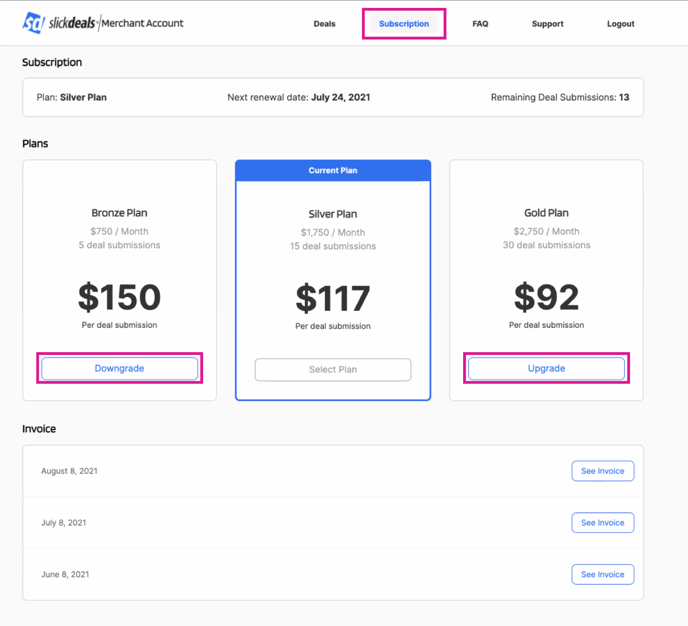
1. Log into your DSF merchant account
2. Select the "Subscription" tab from the menu
3. Choose which plan you'd like to switch to
4. Confirm the change
If you downgrade your subscription, it will take effect on your next billing cycle. If you upgrade your subscription, it will take effect immediately.
Cancelling your DSF subscription
To cancel your DSF subscription, you may:
- Email merchants@slickdeals.net -- or --
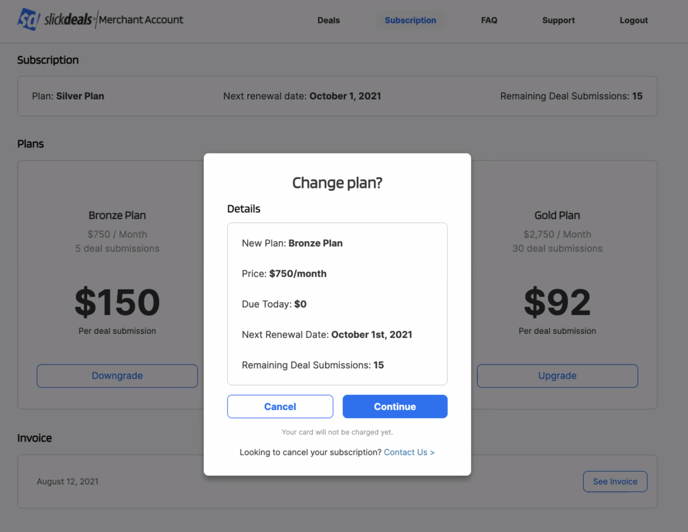
- Follow the steps above to choose a new subscription. Instead of confirming your change, follow the "contact us" link at the bottom of the "Change Plan" window (see image below)