![SD-Advertising-Logo-Full-Color.png]](https://help.merchants.slickdeals.net/hs-fs/hubfs/SD-Advertising-Logo-Full-Color.png?height=40&name=SD-Advertising-Logo-Full-Color.png)
What is a native ad placement?
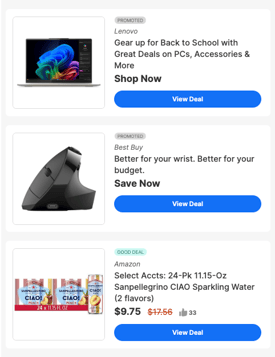
Native Ads are paid media placements on Slickdeals that customers can leverage to boost the performance of their deals.
When is my deal eligible to be boosted via a native ad placement?
When a live deal reaches a +3 vote score or higher from the community, it becomes eligible for a native ad placement. On your dashboard in the self-service portal, eligible deals will have a "boost" button next to the deal.
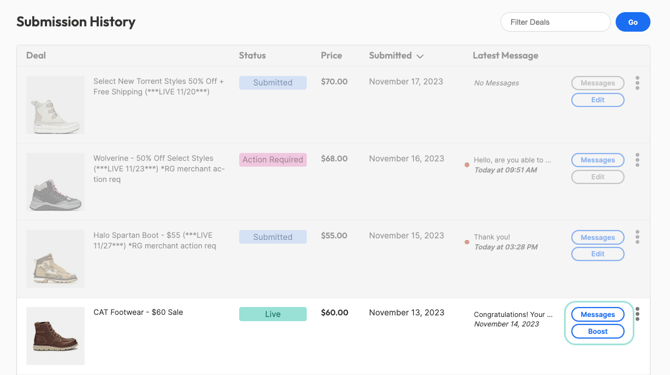
Which native ads can I purchase to boost my deal?
Eligible deals may be boosted through the following placements onsite:
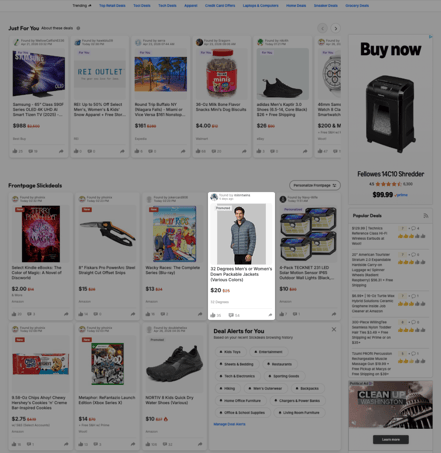
- Featured Deals: Featured Deals are premium Frontpage tiles that are interspersed throughout the Frontpage deal feed to appear more organic, resulting in higher clicks, transactions, and sales.
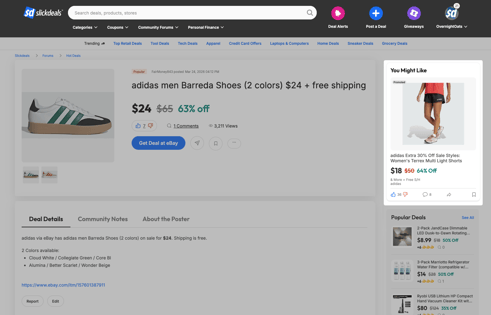
- You Might Like Tiles: The You Might Like Tile is a targeted placement on Deal Details Pages. Your deal will be targeted across relevant Deal Details Pages using brand, store, and/or category keywords to target high-intent shoppers.
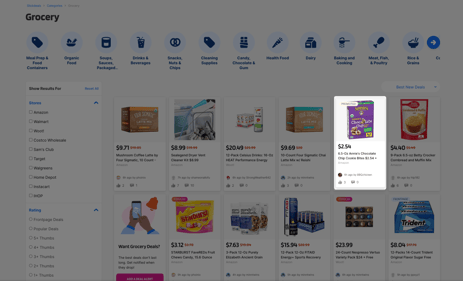
- Promoted Category Deals: Promoted Category Deals are promoted deal tiles on Category pages, allowing you to engage shoppers looking for deals within your category.
- Daily Newsletter Inclusion: Promote your deal in one of our Daily Newsletter sends, which are sent to our full email distribution list.
How do I purchase a native ad?
- In the self-service portal, click the "boost" button next to the deal you would like featured. Upon clicking the "boost" button, you will be taken to a form where you can select the native ad type you would like to purchase.
- Complete the form with the correct information and hit "submit".
- A DSF team member will review your submission as well as the live deal you would like boosted.
- Once the details are confirmed, an Insertion Order (IO) will be sent to the Billing Address you provided on the form. Please review, sign, and return the IO.
- Upon receiving the IO, our team will schedule your placement(s).
- An invoice will then be sent to the Billing Email address provided on the form. Please complete the payment per the terms outlined in the invoice.
How much do these placements cost?
Pricing varies based on seasonality. Please reach out to merchants@slickdeals.net for the most up to date rate information.